Reading and searching
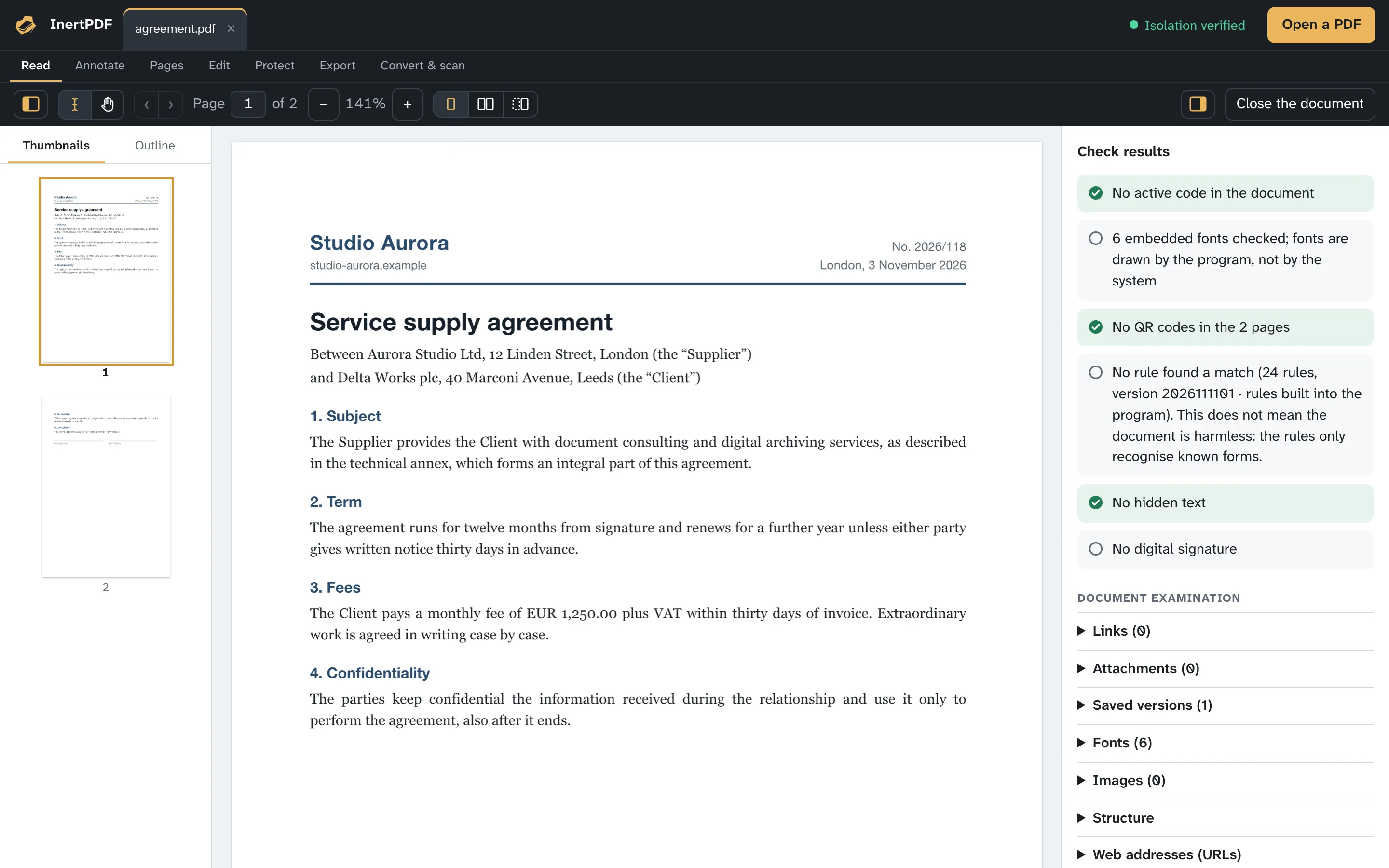
Open from the menu, by dragging the file or from the recent list (the last 12, with a thumbnail of the first page); a protected PDF asks for its password, which is never saved. Several documents in tabs or side-by-side windows. Thumbnails, an outline with editable bookmarks, single page, two pages or book layout, full-screen presentation and day, sepia and night reading themes. Zoom from the keyboard and with the scroll wheel, keeping the point under the pointer still, the hand tool to drag the page, Back and Forward. Links to pages of the document are followed with a click; links to the outside are shown and can be copied, never opened. Text search that ignores case and accents and highlights every match; selectable, copyable text. Printing at the page's real size. The interface can be enlarged up to 140%.
Annotating
Highlight, underline, strike out, note, text, rectangle, ellipse, line, arrow and double arrow, symbols (check, cross, star, arrows, plus and minus, circled numbers), freehand and eraser, with colour, thickness and opacity. Ready-made stamps and your handwritten signature as an image (it is not a digital signature). They are real PDF annotations that other readers see too; those made with InertPDF can be moved, resized and deleted. You can remove all notes at once or save a summary of them as TXT, Markdown, HTML or CSV. In a signed document, annotations are appended and the signature stays valid.
Pages, watermarks and numbering
Rotate, move (also by dragging the thumbnails), delete, insert from another PDF, add a blank page, duplicate, reverse the order, extract to a new PDF; extracted or deleted pages leave no content of the others in the file. Crop the margins (what falls outside the crop is hidden, not removed: to remove it, redact), change the page size and number pages with their own labels (i, ii, iii… then 1, 2, 3). Split the document by ranges, every N pages, by bookmarks, by maximum size or into odd and even pages. Undo and redo up to twenty operations. Text or image watermarks, headers and footers, page numbers and Bates numbering, which can be removed later. A thumbnail dragged out of the window becomes a PDF with those pages; a PDF dragged between the thumbnails inserts its pages there.
Exporting
Pages as PNG, JPEG, WebP or TIFF images, from 72 to 300 dpi and for the chosen page range. Images contained in the PDF in their original format (JPEGs stay identical) or converted. Word, PowerPoint, HTML, RTF, text or Markdown documents with paragraphs, headings, lists, tables and images rebuilt: the layout becomes a single column, so the result needs rereading. A list of every web address in the document as CSV, text or JSON. PDF security report. Images stopped by the opening check are not saved, and the program says how many there are.
Document examination
Links with their real destination, never opened with a click; attachments you can save but the program never opens; versions saved in the file and changes made after a signature; fonts, images, QR codes and structural anomalies, flagging what deserves attention; the file's origin as reported by the system; MD5, SHA-1 and SHA-256 fingerprints and file dates. The security report in PDF gathers it all and never declares a document “safe”.
Document images
View → Document images opens a window with every image in the PDF and its data: pixels, resolution and size on the page, the pages where it appears, format, colour, EXIF data and SHA-256 fingerprint. A click opens the viewer, with zoom and hand tool; each image can be saved on its own. The isolated process re-encodes the previews as PNG: the bytes of the PDF's images never reach the window, and images stopped by verification have no preview.
Register of opened files
Window → Register of opened files lists the documents opened with InertPDF: name, last path, size, first and last opening, how many times, the result of the checks. A file reopened without findings, with the same program and rules, does not repeat the checks already done; a click reopens the file, and the register says whether it has been moved or changed. It stays on your computer, protected by a seal that reveals tampering, and can be cleared whenever you like.
Compare and validate
Compare two PDFs, or the document with an earlier version saved in the same file: text changes word by word, highlighted on the pages, graphic differences boxed, and metadata, active content and signatures side by side; the report is saved as a PDF. The second document goes through the same opening checks. The accessibility check verifies the PDF/UA and WCAG requirements a machine can check; PDF/A validation checks the main requirements of PDF/A-1b, 2b and 3b, and conversion creates a PDF/A copy that is saved only if validation passes it; if embedded fonts are missing, the copy is made from images of the pages, with OCR. Neither is a certification, and the report says so.
Statistics, notes and references
Characters, words, sentences, language and readability (Flesch and the indices for the other languages), a page-by-page table and the file's MD5, SHA-1 and SHA-256 hashes. Footnotes and endnotes, the bibliography and in-text citations are collected and linked, with DOI, ISBN, arXiv and PMID recognised, and exported as TXT, Markdown, CSV, JSON, BibTeX or RIS.
The program in your system
InertPDF appears in “Open With” for PDFs and images (an image goes to Scan to PDF) without taking over PDFs on its own; if you ask, it becomes the program that opens them with a double click, and you can go back to the previous one at any time. You can drag a file onto the program's icon. Opened documents appear among the system's recent items (on macOS in the Dock and the Apple menu, on Windows in the Jump List), which can be turned off in Settings; on macOS the window title carries the document's icon. In the results, the file's origin shows where the system knows it was downloaded from and with which program; an attachment saved from a PDF carries the “downloaded from the internet” mark, so the system checks it if anyone tries to run it.
Watched folders: choose a folder where PDFs you do not know arrive, such as Downloads or your mail attachments, and every new PDF is examined in isolation; a notification tells you the result before you open it. The file is neither opened nor moved; if it contains active code you can quarantine it, and put it back. If you choose, checking continues even while the program is closed, always in isolation. On Linux these system integrations, the file's origin and folder watching while the program is closed are not available yet.
Five languages
Program, guide and text recognition in Italian, English, French, German and Spanish. The program's language follows the operating system and can be changed in Settings; the system menus also appear in your language.